
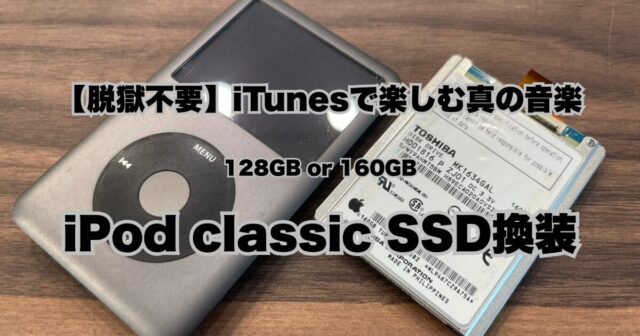
【Summary】 iPod Classic SSD Upgrade in Osaka — Same-Day, No Appointment Needed
- Fix the red X error / clicking hard drive with a fast, silent SSD
- 128GB / 160GB recommended — iTunes sync works perfectly, no jailbreak needed
- Pricing: SSD upgrade ¥23,800 (128GB) / ¥29,800 (160GB) incl. internal cleaning · Battery replacement ¥9,900 · Headphone jack repair ¥9,900 (all tax included)
- Walk-in same-day service at Shinsaibashi, Osaka (3 min from Exit 7)
- Nationwide mail-in repair available — credit card accepted
- Ministry-registered repair shop: R000002 / T000002 · ISO 9001:2015 certified
Why Audiophiles Are Choosing iPod Classic Again in 2026
In the age of streaming and wireless earphones, something unexpected is happening at our Shinsaibashi repair shop. Musicians, audiophiles, and younger listeners are bringing in iPod Classics for full professional restores — not out of nostalgia, but out of a deliberate choice for superior audio quality.
The iPod Classic’s built-in Wolfson DAC chip delivers a warmth and detail that compressed streaming audio simply cannot match. Paired with quality wired earphones, it remains one of the finest portable listening experiences available. The problem? The original mechanical hard drive was never meant to last forever.
The Problem: Why iPod Classic Hard Drives Fail
The iPod Classic uses a 1.8-inch mechanical hard disk drive (HDD). After years of use, these drives inevitably fail, showing the following symptoms:
- Red X / Sad iPod icon — the most common sign of hard drive failure
- Clicking or grinding noise from inside the device
- “Use iTunes to restore” error that won’t go away
- Freezing or skipping during playback
- Extremely slow response when navigating menus
- Folder icon with exclamation mark on startup
The good news: all of these symptoms can be fixed by replacing the HDD with a modern SSD — and your iPod will actually perform better than when it was new.
SSD vs HDD: What Changes After the Upgrade
| Feature | Original HDD | After SSD Upgrade |
|---|---|---|
| Boot / startup speed | Slow (10–20 sec) | Near instant |
| Song skipping / menu response | Lag / delay | Instant |
| Operating noise | Clicking / spinning | Completely silent |
| Battery life | Reduced (HDD draws more power) | Significantly improved |
| Drop resistance | Fragile (moving parts) | Much more durable |
| iTunes sync | ✓Works | ✓Works (128GB/160GB) |
The 1TB Upgrade Trap: Why We Don’t Recommend It
Bigger is not always better.
Many online guides promote 1TB or 2TB mSATA upgrades for iPod Classic. While technically possible, these large-capacity upgrades require installing Rockbox — a third-party OS that replaces Apple’s firmware. This means:
iTunes sync no longer works
The original Apple DAC may not function correctly
The familiar iPod interface is replaced
At Smart Doctor Pro, we believe in restoring your iPod Classic to its original perfection — with faster, more reliable storage that keeps everything working exactly as Apple intended.
Our Recommendation: 128GB or 160GB SSD
For the vast majority of music libraries, 128GB or 160GB is more than enough — approximately 30,000–40,000 songs in AAC 256kbps, or 2,000–3,000 albums in lossless ALAC format. This size range works flawlessly with Apple’s original firmware on all iPod Classic models, maintaining full iTunes compatibility with no modifications required.
✓Smart Doctor Pro iPod Classic Services & Pricing (tax included)
- ✓HDD → SSD replacement (iFlash adapter) — ¥23,800 (128GB) / ¥29,800 (160GB) incl. internal cleaning
- ✓Battery replacement (high-capacity cell) — ¥9,900
- ✓Headphone jack repair (no sound / one side only) — ¥9,900
- ✓Full restore (firmware reinstall via iTunes)
- ✓Scroll wheel cleaning / exterior polish
- ✓Full function test before return
- ✓3-month repair warranty on the repaired part (consumable parts such as batteries: initial defects within one week)
Compatible Models
- iPod Classic 7th Gen (160GB — final model, 2009) ← Most requested
- iPod Classic 6th Gen (80GB / 120GB / 160GB thick)
- iPod Video 5th / 5.5th Gen (30GB / 60GB / 80GB)
Not sure which generation you have? Bring it in — our staff will identify it for you on the spot.
Visit Us in Osaka: Same-Day Walk-In Service
Smart Doctor Pro is located in Osaka’s Minami area (America Mura), just 3 minutes walk from Shinsaibashi Station Exit 7 (Osaka Metro Midosuji / Nagahoritsurumiryokuchi Line). If you’re visiting Osaka as a tourist or on business, you can drop in without an appointment.
- Address: 1-8-9 Nishishinsaibashi, Chuo-ku, Osaka 542-0086 (Shodo Bldg. 1F)
- Hours: Mon–Fri 11:00–21:00 / Sat, Sun & Holidays 10:00–21:00 (Open 365 days)
- Phone: 0120-960-690
- From Namba: 10–15 min walk, or 1 stop on Midosuji Line
- From Umeda / Osaka Station: Midosuji Line, approx. 6 min
- From Tennoji: Midosuji Line, approx. 10 min
- English available at our store ✓
Mail-In Repair from Anywhere in Japan
Can’t make it to Osaka? We accept mail-in repairs from anywhere in Japan. Simply send your iPod Classic to our Shinsaibashi service center and we’ll repair and return it — typically on the same day we receive it.
- Credit card payment accepted
- Repaired device returned with 3-month warranty card
- Contact us for an estimate before sending — a diagnosis fee applies for device inspection
Other repair services in Osaka Shinsaibashi
Frequently Asked Questions
Frequently Asked Questions (FAQ)
QCan you fix the red X error on my iPod Classic?
Yes. The red X (sad iPod) error is almost always caused by a failing mechanical hard drive. We replace the old HDD with a fast, silent SSD using a compatible iFlash adapter. Your iPod will be restored to full working condition with iTunes sync intact — no jailbreak required. Walk-in same-day service available at our Shinsaibashi store, or send it to us by mail from anywhere in Japan.
QWhat SSD size do you recommend for iPod Classic?
We recommend 128GB or 160GB for most users. These sizes work perfectly with the original Apple firmware and iTunes sync — no jailbreak needed. Upgrades beyond 128GB on 6th Gen models require special handling due to LBA28 addressing limits. We advise against 1TB upgrades as they require jailbreaking, which disables iTunes sync and risks instability.
QI’m a tourist visiting Osaka. Can you fix my iPod Classic today?
Absolutely. No appointment needed. Walk in to our Shinsaibashi store and we’ll assess your iPod on the spot. Standard SSD upgrades and battery replacements are typically completed the same day. We are located 3 minutes walk from Exit 7 of Shinsaibashi Station (Osaka Metro). English is spoken at our store.
QDo you offer mail-in repair for iPod Classic?
We accept mail-in repairs from anywhere in Japan. We accept credit card payments for mail-in repairs. Turnaround is typically same day as receipt, and we ship back promptly with a 3-month warranty card.
QWhat is included in a full restore service?
Our full restore service includes: SSD upgrade (replacing the failing HDD), battery replacement, cleaning of the exterior and scroll wheel, firmware restoration via iTunes, and a full function test. Registered with Japan’s Ministry of Internal Affairs and Communications (No. R000002 / T000002). We work within the registered scope of models and repair items.
Why Choose Smart Doctor Pro?
- Ministry-registered repair shop — Registration No. R000002 / T000002 (Japan Ministry of Internal Affairs and Communications)
- ISO 9001:2015 certified — for smartphone parts import and repair. Repairs follow a documented procedure
- Proven track record — Founded in 2009, over 60,000 repairs per year
- Your data normally stays on the device — iTunes restore process keeps your music library intact. Depending on the condition of the device, however, we may not be able to guarantee the data
- 3-month repair warranty on the repaired part (consumable parts such as batteries: initial defects within one week)
- iPod repair menu →
- Nationwide mail-in repair →
- Shinsaibashi store details & map →
- Japanese version →
 |
About the Author Smart Doctor Pro Editorial Team Founded in 2009. The first storefront repair shop in Japan to receive Ministry registration (T000002 / R000002). ISO 9001:2015 certified (smartphone parts import & repair). Over 60,000 repairs per year. Our expert team covers iPhone, iPad, iPod, Android, and Mac repairs. Featured in ABC TV “Cast”, Nikkei Sangyo Shimbun, and GIGAZINE. |
© Smart Doctor Pro. All content on this site is protected by copyright. Unauthorized reproduction is strictly prohibited.
- Same-day repair possible
- Your data kept whenever possible
- English OK
- No appointment needed
Hours:Mon–Fri 11:00–21:00 / Sat, Sun & holidays 10:00–21:00 (open all year)
Editorial & Technical Review
Smart Doctor Pro (operated by CREA Inc. / Corporate No. 8120001165987). A repair business registered with Japan's Ministry of Internal Affairs and Communications (Telecommunications Business Act: T000002 / Radio Act: R000002), ISO 9001:2015 certified. Based on over 60,000 repairs a year, articles are written by our editorial team and reviewed by our Quality Management Office.
Registered Repair BusinessTelecommunications Business Act: T000002
Radio Act: R000002
repairs a year(per year)